Cyber Deals - Get up to 65% off on CKA, CKAD, CKS, KCNA, KCSA exams and courses!

Experimenting GitHub Container Registry

Experimenting GitHub Container Registry

Recently GitHub announced public beta availability of their Container Registry and I thought I will give it a try. So in this article I will take you through the basic setup for pushing docker images to GitHub Container Registry and do a simple CI. GitHub Container Registry is free for public images (Public repos) and for private repos, its free during the beta phase. Please keep that in mind, once the beta goes to GA charges are applicable.

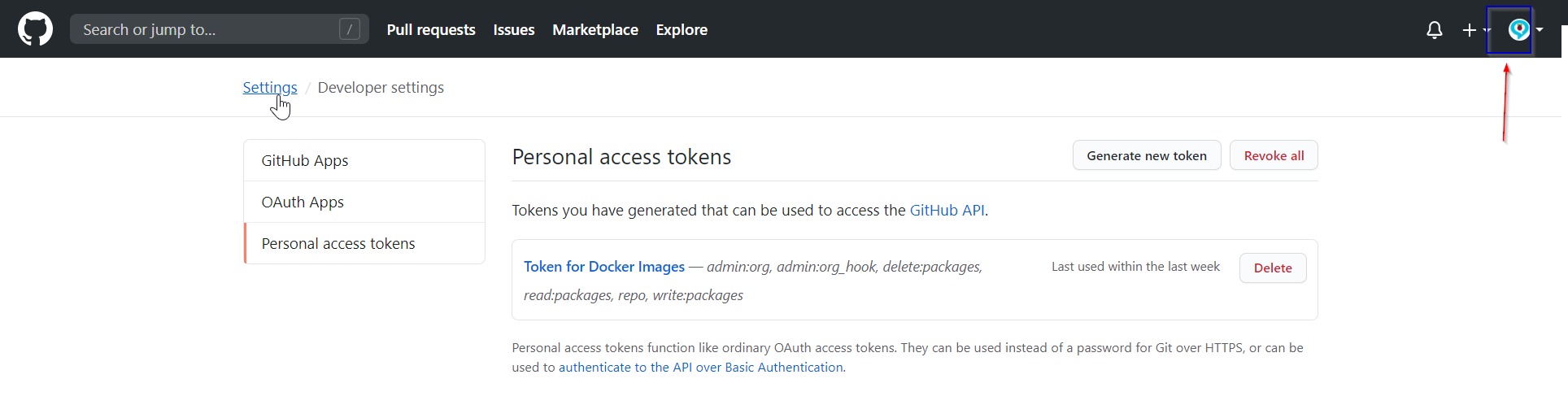
The Setup 1. First we need to generate PAT token from the User Settings -> Developer Settings. The PAT token will help you to authenticate with GitHub.
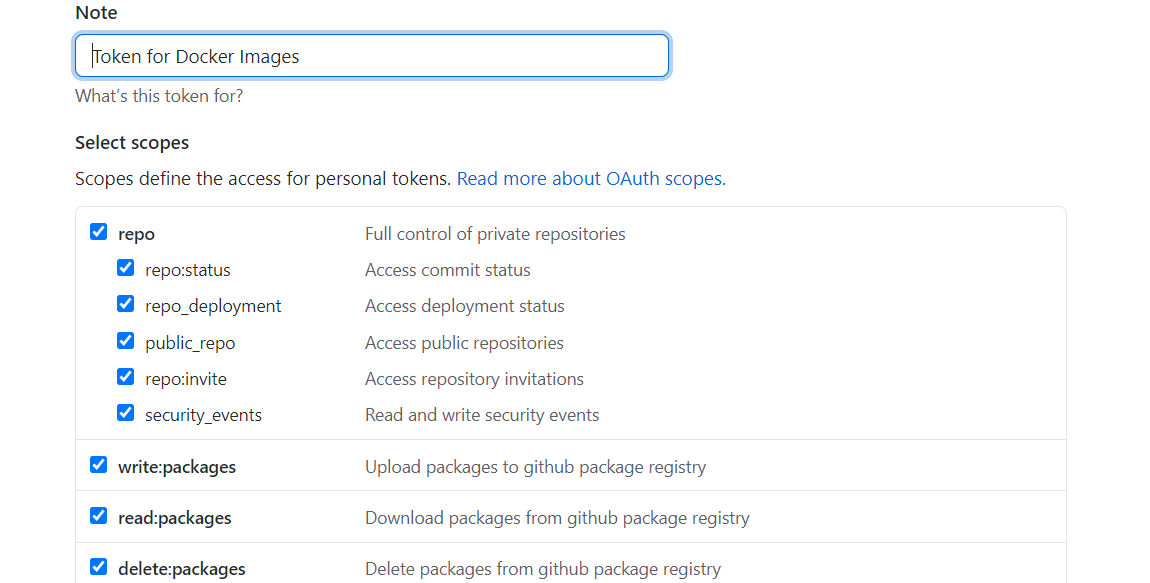
2. Assign the corrections permissions to the Token. You need below permission to push the image to the registry read:packages write:packages delete:packages
3. Save your PAT and it is recommended to store it in your environment variables in the machine $ export CR_PAT=YOUR_TOKEN First push to GitHub Container Registry 4. Login into GitHub Container Registry using below command in the machine $ echo $CR_PAT | docker login ghcr.io -u USERNAME --password-stdin 5. Build the docker image and tag with following name convention # docker build -t ghcr.io/OWNER/IMAGE_NAME:VERSION .docker build -t ghcr.io/mysticrenji/react-netcore:1.0 . 6. Push the image to the registry docker push ghcr.io/mysticrenji/react-netcore:1.0 7. Once you pushed the image, it will available in the packages section in GitHub Home Page
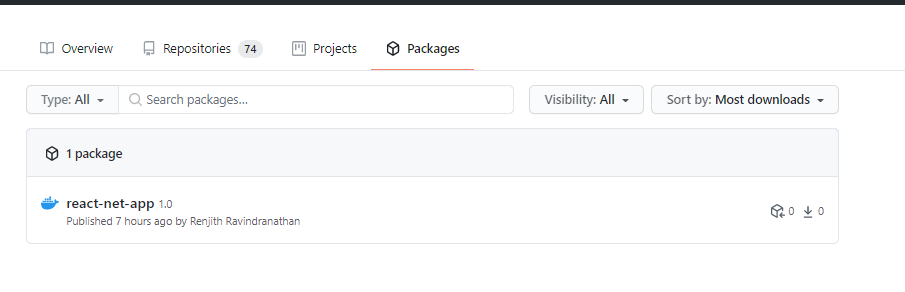
By default the images pushed to GitHub Container Registry will be in private mode by default. You may have to change it, if required. Putting everything together into CI Process GibHub Actions yml

name: CIon:push:branches: [ master ]pull_request:branches: [ master ]jobs:build:runs-on: ubuntu-lateststeps:- uses: actions/checkout@v2- name: Docker Pushrun: |echo ${{ secrets.CR_PAT }} | docker login ghcr.io -u $GITHUB_ACTOR --password-stdindocker build . --tag ghcr.io/mysticrenji/react-netcore:$GITHUB_SHAdocker push ghcr.io/mysticrenji/react-netcore:$GITHUB_SHA

That’s all folks. Please try it and let me know your thoughts on this. Github Repo This article has been originally taken from my blog

Renjith Ravindranathan

Renjith Ravindranathan

A DevOps engineer by profession, dad, traveler and more interestingly to tweak around stuff inside memory constrained devices during spare time.


Disclaimer: Views expressed in articles are those of the respective authors and do not necessarily reflect the views of their employers or this site. While we aim for accuracy, please verify information before relying on it, and let us know if you spot an error.
Share:

Related Posts

Containerize Window Application & deploy into AWS Elastic Kubernetes Service (EKS)

Containerize Window Application & deploy into AWS Elastic Kubernetes Service (EKS)

Hi everyone! for this general walkthrough I will be explaining my experiences containerizing an Window Application into Window Container which will be …

Self hosted runners for GitHub Actions

Self hosted runners for GitHub Actions

In this article, I will take you through setting up self hosted runners for GitHub Actions. It is similar to Azure Devops Pipelines Build Agents...

How to Install VMWare vCenter Server Appliance

How to Install VMWare vCenter Server Appliance

When we talk about virtualization, VMWare is one of the best choice and most popular in town. You can download VMware vSphere Hypervisor 6.7 for...

OpenShift 4: OSSM Jaeger`s External ElasticSearch

OpenShift 4: OSSM Jaeger`s External ElasticSearch

One of the features provided by Red Hat OpenShift Service Mesh(OSSM) is tracing capability. This capability is provided by Jaeger, an OpenTracing …

OpenShift 4: EgressIP for egress(outbound) connection

OpenShift 4: EgressIP for egress(outbound) connection

Introduction By default, all namespace egress networking will be using host IP where the pod sits as SNAT rule, similar to how our home router...

OpenShift 4: Installation Bonding Setup

OpenShift 4: Installation Bonding Setup

Objective Setting up 2 x LACP bonding using boot params options. For guidance on the boot params available look here. (Cover image : 2 x...