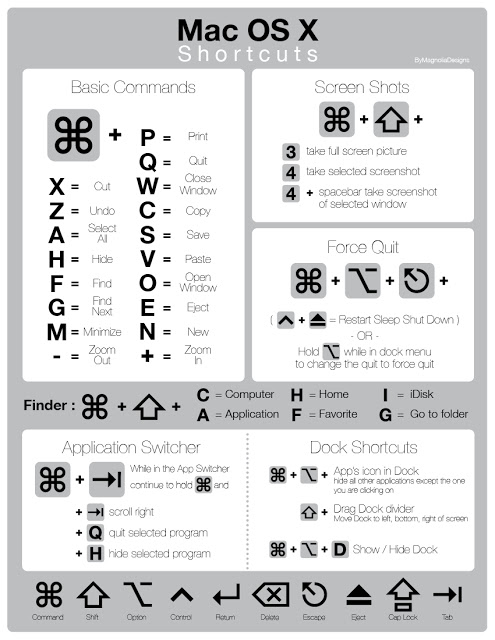
Source : [support.apple.com](http://support.apple.com/kb/HT1343)To use a keyboard shortcut, or key combination, you press a modifier key with a character key. For example, pressing the Command key (the key that has a symbol) and the “c” key at the same time copies whatever is currently selected (text, graphics, and so forth) into the Clipboard. This is also known as the Command-C key combination (or keyboard shortcut). A modifier key is a part of many key combinations. A modifier key alters the way other keystrokes or mouse clicks are interpreted by Mac OS X. Modifier keys include: Command, Control, Option, Shift, Caps Lock, and the fn key (if your keyboard has a fn key).Here are the modifier key symbols you can see in Mac OS X menus:
(Command key) – On some Apple keyboards, this key also has an Apple logo (
)
(Control key)
(Option key) – “Alt” may also appear on this key
(Shift key)
(Caps Lock) – Toggles Caps Lock on or off fn (Function key)
Startup keyboard shortcuts Press the key or key combination until the expected function occurs/appears (for example, hold Option during startup until Startup Manager appears, or Shift until “Safe Boot” appears). Tip : If a startup function doesn’t work and you use a third-party keyboard, connect an Apple keyboard and try again.
Key or key combination
What it does
Option
Display all bootable volumes ([Startup Manager](http://support.apple.com/kb/HT1310))
Shift
Perform a [Safe Boot](http://support.apple.com/kb/HT1564) (start up in [Safe Mode](http://support.apple.com/kb/HT1455))
C
Start from bootable media (DVD, CD, USB thumb drive, and so forth)
T
Start in FireWire target disk mode
N
Start from NetBoot server
X
Force Mac OS X startup (if non-Mac OS X startup volumes are present)
Command-V
Start in Verbose Mode
Command-S
Start in Single User Mode
See also: Startup key combinations for Intel-based Macs.
Disclaimer: Views expressed in articles are those of the respective authors and do not necessarily reflect the views of their employers or this site. While we aim for accuracy, please verify information before relying on it, and let us know if you spot an error.