
Image registry storage is best and recommended to run on S3 storage endpoint(then filesystem storage, then block). In this blog context, we are going to see how OpenShift Container Storage (OCS) NooBaa S3 provider technically can be used(not officially supported at the moment of this blog written from OCS perspective).
In order to do that, openshift-image-registry-operator and image-registry pod need to trust NooBaa S3 https CA certificate. By right this CA certificate is not trusted, so we need to populate this certificate to all node using proxy/cluster CustomResource(CR).
Prerequisites.
- OpenShift Container Storage(OCS) installed and running.
- Replaced default ingress certificate (optional, you can get default CA to be used, in this blog we already replaced the ingress certificate and will use that instead).
- NooBaa S3 bucket created and region properly assigned.
- Obtain NooBaa S3 bucket accesskey and secretkey.
- Connection from node to external app wildcard (yes I know, this is non-optimal route path that traffic has to go out from and into SDN again), attempt to use internal service name failed as node kubelet unable to resolved internal S3 DNS name (still figuring out this portion to use service name instead). Example below:

Steps – NooBaa S3 Preparation
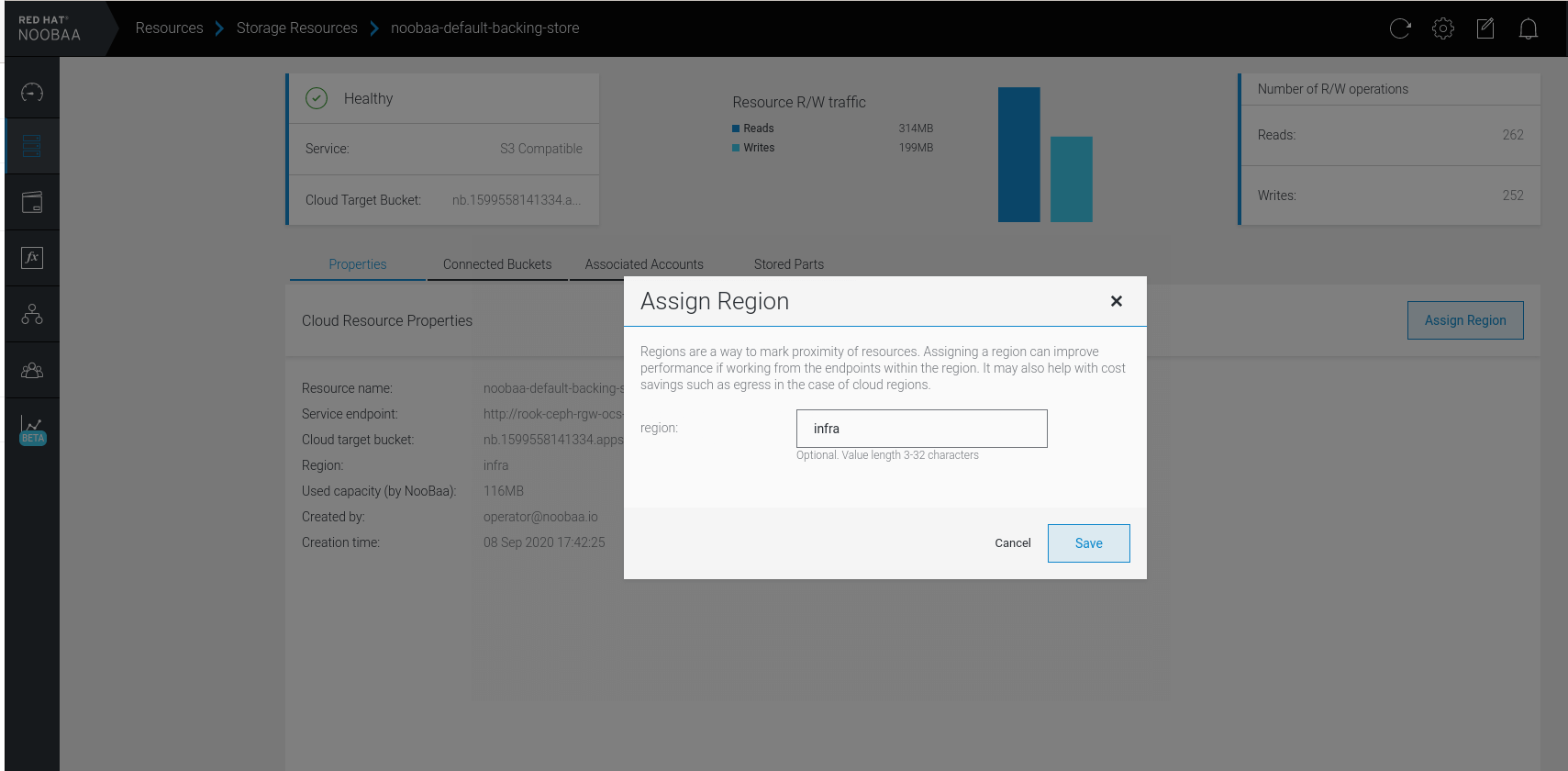
Note : We are using default noobaa-default-backing-store, create your own if you want to use different backing store.1. Assign region to backing store, Resource > Storage Resources > noobaa-default-backing-store > Assign Region > region: infra :
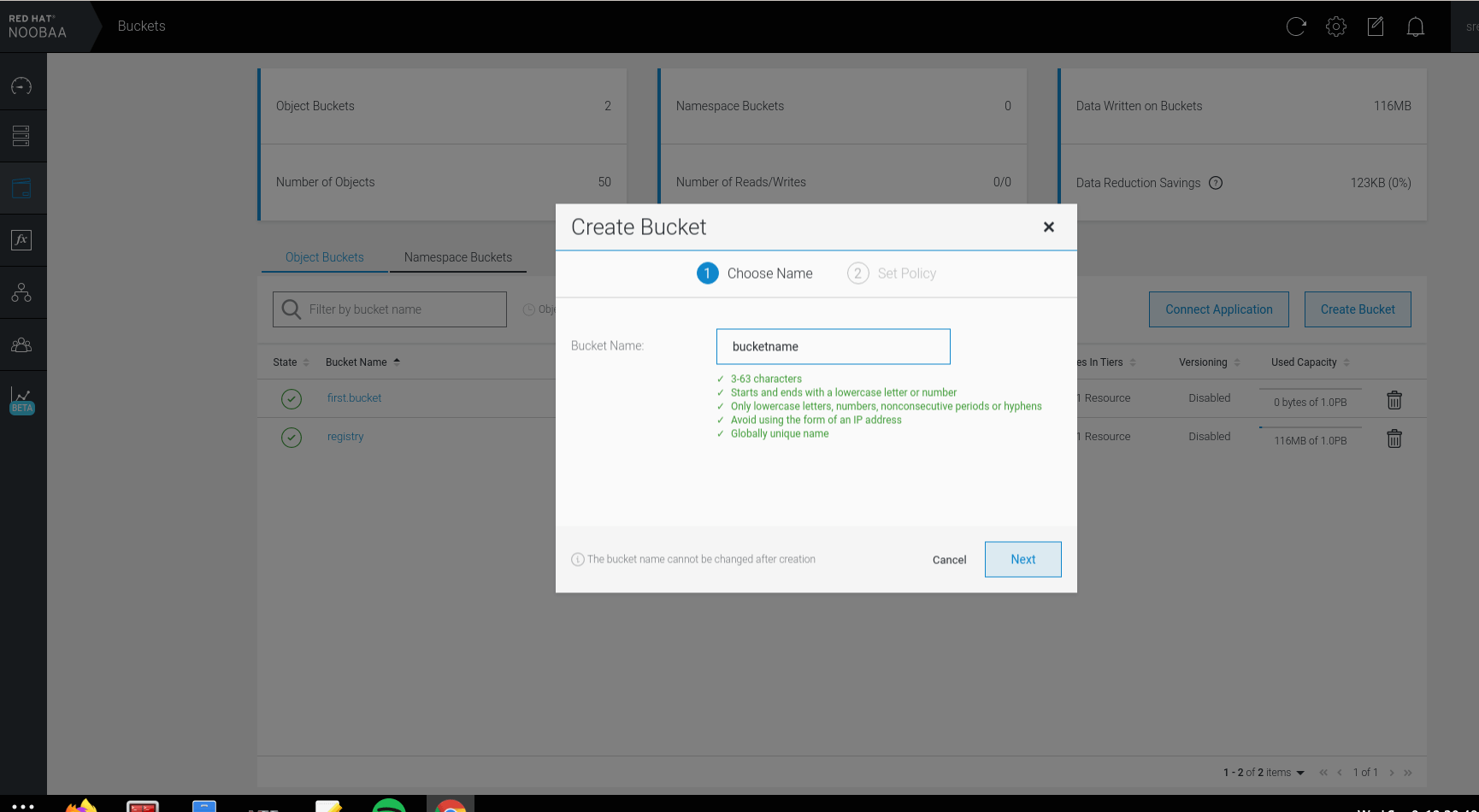
- Login to NooBaa console, Buckets > Create Bucket > Bucket Name: registry > Next > Policy Type: Spread (we need multiple different backing store to use mirror, we are using spread and relying on underlying Ceph cluster) > Tick default backing store > Create .
- Get all bucket information, Buckets > Connect Applications :
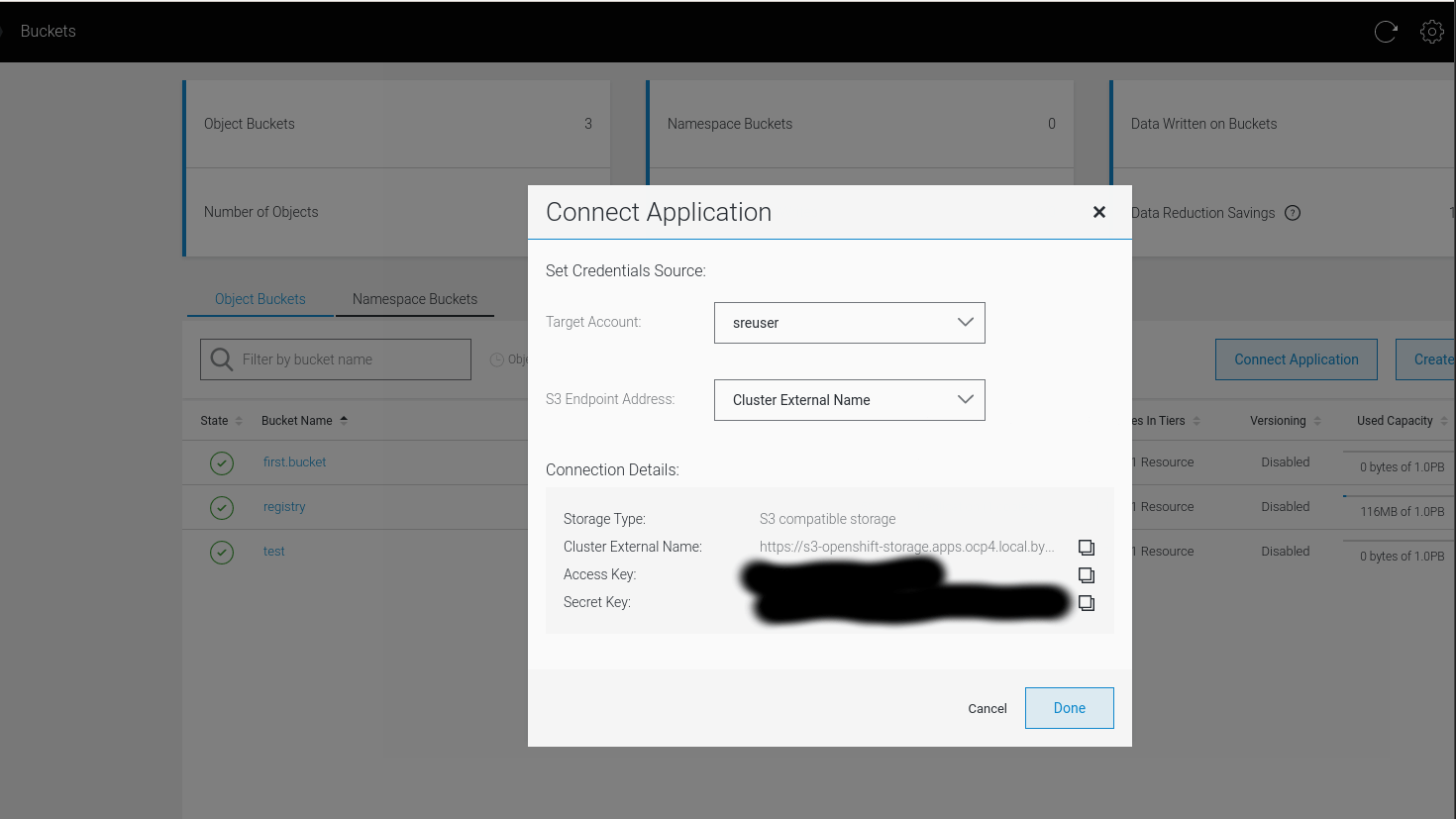
Steps – Configuring
- Create ConfigMap with root CA certificate to sign the wildcard ingress route.
oc create configmap custom-ca \
     --from-file=ca-bundle.crt=custom-cabundle.crt> \
     -n openshift-config
- Create new cluster wide CA trust bundle.
oc patch proxy/cluster \
     --type=merge \
     --patch='{"spec":{"trustedCA":{"name":"custom-ca"}}}'
Nodes will start rebooting once the proxy/cluster patched.3. Next create secret for replacing default ingress certificate with new wildcard certificate:
oc create secret tls custom-cert \
     --cert=wildcard.crt \
     --key=wildcard.key \
     -n openshift-ingress
- Patch ingresscontroller to use new certificate.
oc patch ingresscontroller.operator default \
     --type=merge -p \
     '{"spec":{"defaultCertificate": {"name": "custom-cert"}}}' \
     -n openshift-ingress-operator
Hint : At this stage the custom root CA is trusted cluster wide, hence when we connecting the registry to the S3 external endpoint (internal service endpoint not possible due to earlier error), the NooBaa S3 route endpoint is using reencrypt termination, thus will trust the replaced ingress certificate.5. Now lets configure the registry to use NooBaa S3, we have created:
- S3 Bucket Name: registry
- S3 Bucket Region: infra
- S3 Region Endpoint: https://s3-openshift-storage.apps.ocp4.local.bytewise.my/
- Configure secret to hold S3 AccessKey and SecretKey:
oc create secret generic image-registry-private-configuration-user --from-literal=REGISTRY_STORAGE_S3_ACCESSKEY=xxxxxxx --from-literal=REGISTRY_STORAGE_S3_SECRETKEY=yyyyyy --namespace openshift-image-registry
- Lastly, edit oc edit configs.imageregistry.operator.openshift.io cluster, ensure managementState is “Managed” and storage section configured like example below:
# oc edit configs.imageregistry.operator.openshift.io cluster
<TRUNCATED>
  managementState: Managed
<TRUNCATED>
  storage:
    s3:
      bucket: registry
      region: infra
      regionEndpoint: https://s3-openshift-storage.apps.ocp4.local.bytewise.my/
<TRUNCATED>
HINT : openshift-image-registry-operator will validate the new CR configured. It validates if S3 endpoint configuration is valid. Therefore, if there no image-registry pod is progressing, inspect operator pod logs, it will give you some hint why it stop progressing or spawning to new configuration.
Validation
- To validate we can build (or push) image to registry and run the pod.
- Validate the image-registry pod environment:
# oc get deployment image-registry -oyaml
<TRUNCATED>
      containers:
      - env:
        - name: REGISTRY_STORAGE_S3_REGIONENDPOINT
          value: https://s3-openshift-storage.apps.ocp4.local.bytewise.my/
        - name: REGISTRY_STORAGE
          value: s3
        - name: REGISTRY_STORAGE_S3_BUCKET
          value: registry
        - name: REGISTRY_STORAGE_S3_REGION
          value: infra
        - name: REGISTRY_STORAGE_S3_ENCRYPT
          value: "false"
        - name: REGISTRY_STORAGE_S3_VIRTUALHOSTEDSTYLE
          value: "false"
        - name: REGISTRY_STORAGE_S3_USEDUALSTACK
          value: "true"
        - name: REGISTRY_STORAGE_S3_ACCESSKEY
          valueFrom:
            secretKeyRef:
              key: REGISTRY_STORAGE_S3_ACCESSKEY
              name: image-registry-private-configuration
        - name: REGISTRY_STORAGE_S3_SECRETKEY
          valueFrom:
            secretKeyRef:
              key: REGISTRY_STORAGE_S3_SECRETKEY
              name: image-registry-private-configuration
<TRUNCATED>

Muhammad Aizuddin Zali
RHCA | AppDev & Platform Consultant | DevSecOps
Disclaimer: Views expressed in articles are those of the respective authors and do not necessarily reflect the views of their employers or this site. While we aim for accuracy, please verify information before relying on it, and let us know if you spot an error.

 Gineesh Madapparambath


 Aneesh Mohan