One of the features provided by Red Hat OpenShift Service Mesh(OSSM) is tracing capability. This capability is provided by Jaeger , an OpenTracing compliant component.
In order to store the tracing data, Jaeger required storage backend. Jaeger support several storage backends such as:
- Cassandra 3.4+
- ElasticSearch 5.x, 6.x, 7.x
- Kafka
- In-Memory storage
In this blog we going to explore how we can use external ElasticSearch strorage backend instead of operator deployed ElasticSearch.
Prerequisites.
There are several prerequisites that this blog would not recover, ensure that below step are succesfully executed prior attempting step in this blog:
- OpenShift Service Mesh operators deployed . (Do not deploy SMCP first)
- istio-system namespace created.
- External ElasticSearch . (Our elasticsearch deployed at #, RHEL 8)
Configuration steps.
- In istio-project, create SMCP(Service Mesh Control Plane) with below content:
apiVersion: maistra.io/v1
kind: ServiceMeshControlPlane
metadata:
  name: main-install
  namespace: istio-system
spec:
  istio:
    tracing:
      enabled: false
    global:
      tracer:
        zipkin:
          address: "external-jaeger-collector.istio-system.svc:9411"
      proxy:
        resources:
          requests:
            cpu: 100m
            memory: 128Mi
          limits:
            cpu: 500m
            memory: 128Mi
    gateways:
      istio-egressgateway:
        autoscaleEnabled: true
      istio-ingressgateway:
        autoscaleEnabled: true
        ior_enabled: true
    grafana:
      enabled: true
    kiali:
      enabled: true
      dashboard:
        jaegerURL: "https://jaeger-istio-system.apps.ocp4.local.bytewise.my"
      jaegerInClusterURL: "external-jaeger-query.istio-system.svc"
    mixer:
      policy:
        autoscaleEnabled: false
      telemetry:
        autoscaleEnabled: false
        resources:
          requests:
            cpu: 100m
            memory: 1Gi
          limits:
            cpu: 500m
            memory: 4Gi
    pilot:
      resources:
        requests:
          cpu: 100m
          memory: 128Mi
      autoscaleEnabled: false
      traceSampling: 50
Note several sections:
a. istio.tracing.enabled is set to "
false
".
b. istio.global.tracer.zipkin.address is set to "
external-jaeger-collector.istio-system.svc:9411
".
c. kiali.dashboard.jaegerURL is set to "
#
".
d. kiali.jaegerInClusterURL is set to "
external-jaeger-collector.istio-system.svc
".
- In istio-project, create Jaeger CR to deploy external Jaeger(external from istio-operator) with below content:
apiVersion: jaegertracing.io/v1
kind: "Jaeger"
metadata:
  name: "external-jaeger"
  # Deploy to the Control Plane Namespace
  namespace: istio-system
spec:
  strategy: production
  storage:
    type: elasticsearch
    options:
      es:
        server-urls: # # our external elasticsearch
  # Set Up Authentication for OpenShift
  ingress:
    enabled: true
    security: oauth-proxy
    openshift:
      # This limits user access to the Jaeger instance to users who have access
      # to the control plane namespace. Make sure to set the correct namespace here
      sar: '{"namespace": "istio-system", "resource": "pods", "verb": "get"}'
      htpasswdFile: /etc/proxy/htpasswd/auth

  volumeMounts:
  - name: secret-htpasswd
    mountPath: /etc/proxy/htpasswd
  volumes:
  - name: secret-htpasswd
    secret:
      secretName: htpasswd
More documentation available at https://maistra.io/docs/monitoring_and_tracing/using-existing-jaeger
Validation
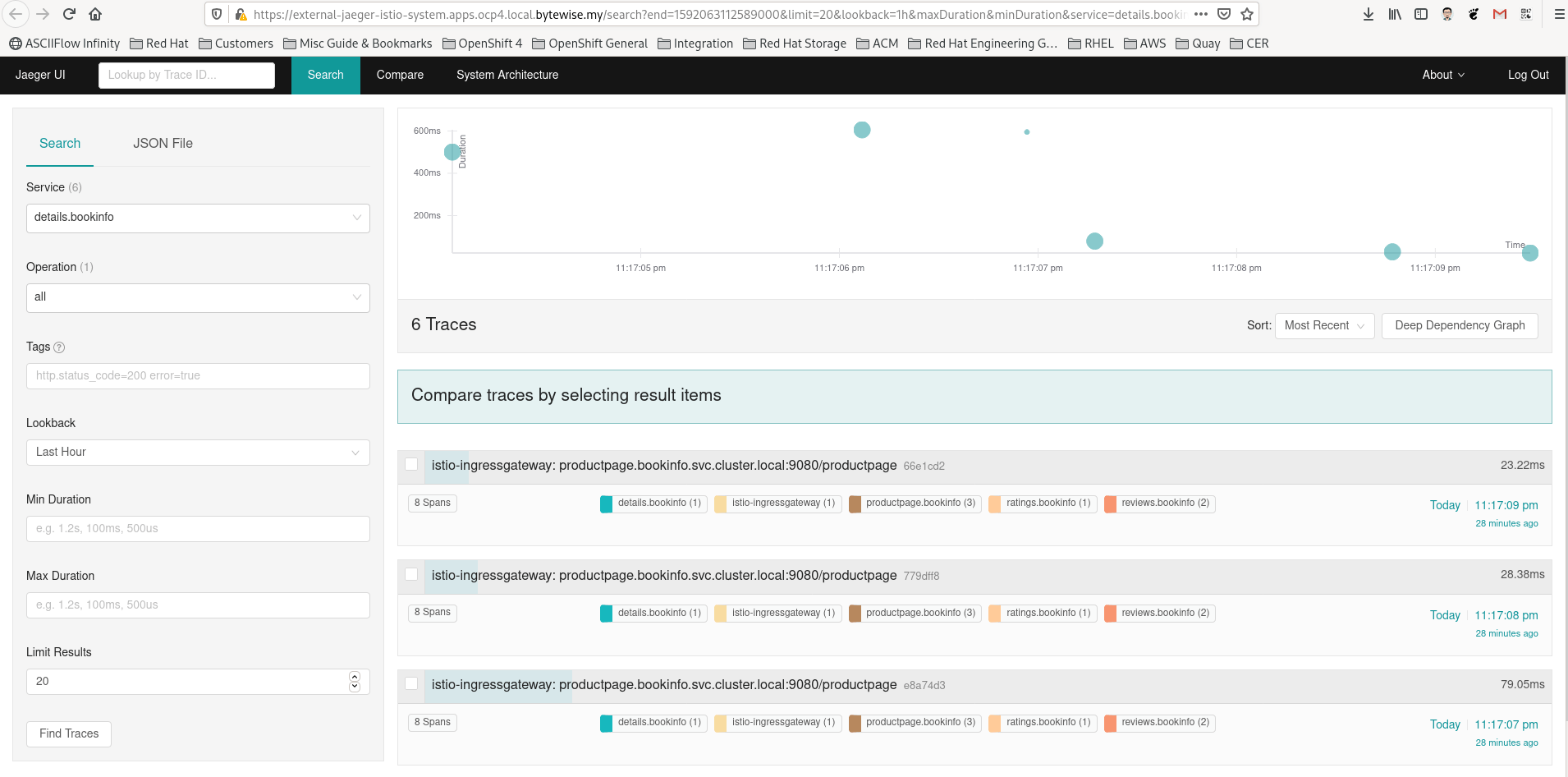
Generate some traffic for the service mesh apps to get some tracing data flowing in, if there is no existing apps please follow the example provided from here .
On the elasticsearch node:
root ># curl -k http://192.168.50.10:9200/_cat/indices
yellow open jaeger-service-2020-06-13 e79y1ModTfm7E9hoAcKvKA 5 1   20 1  46.1kb  46.1kb
yellow open jaeger-span-2020-06-13    abI8z42MT4qYnfHnD067ZQ 5 1 2308 0 504.3kb 504.3kb
NOTE: In this example, the shard are in the yellow state due to no replica (since ES is an PoC setup).3. Browse to Jaeger Console:

Muhammad Aizuddin Zali
RHCA | AppDev & Platform Consultant | DevSecOps

 Gineesh Madapparambath