Overview
In my previous posts, I have shared the overview , installation procedure and how to trigger compliance scans using the Red Hat OpenShift compliance operator. In this post, I will discuss how to check the scan results and apply the required remediations to the cluster.
Results
Once the scan is triggered based on the compliance profile, the operator triggers different pods to perform the checks. Run the below command to check the scan results.
$ oc -n openshift-compliance get compliancescans
Run the below command to get a list of all the checks associated with the scans, executed along with the status and severity.
$ oc -n openshift-compliance get compliancecheckresults
Each result is the output of a compliance rule that it checks. Check the table below to understand the different statuses and their descriptions.
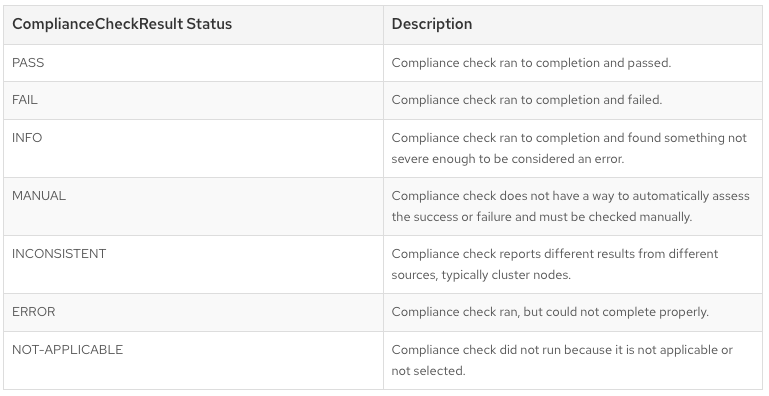
Source: Managing Compliance Operator result and remediation
Remediations
All the rules that has the status of FAIL needs to be reviewed and remediated.
If a rule has failed and the compliance operator can remediate it automatically, a complianceremediation object is created with the same name as the rule. Run the below command to get a list of all the complianceremediation objects.
$ oc -n openshift-compliance get complianceremediation

NAME                                                            STATE

ocp4-cis-api-server-encryption-provider-cipher                  NotApplied
ocp4-cis-api-server-encryption-provider-config                  NotApplied
ocp4-cis-node-master-kubelet-configure-event-creation           NotApplied
ocp4-cis-node-master-kubelet-configure-tls-cipher-suites        NotApplied
ocp4-cis-node-master-kubelet-enable-iptables-util-chains        NotApplied
ocp4-cis-node-master-kubelet-enable-protect-kernel-defaults     NotApplied
ocp4-cis-node-master-kubelet-enable-protect-kernel-sysctl       NotApplied

...<output omitted>
Remediations are not applied automatically so that the administrator can review the remediation steps and only apply them after verification. Run the below command to review the complianceremediation object.
$ oc -n openshift-compliance get complianceremediation
ocp4-cis-api-server-encryption-provider-cipher
 -o yaml

kind: ComplianceRemediation
metadata:
  ..<output-omitted>
spec:
  apply: false
  current:
    object:

apiVersion: config.openshift.io/v1
      kind: APIServer
      metadata:
        name: cluster
      spec:
        encryption:
          type: aescbc

  outdated: {}
  type: Configuration
status:

 applicationState: NotApplied
In the above example, you can see a change in the APIServer cluster object will be applied by enabling encryption.
NOTE: If you use the “default-auto-apply” scan setting which has “autoApplyRemediations” option set to “true”, remediation objects will get automatically applied.
After the remediation steps have been reviewed, run the below command to apply the remediation.
$ oc -n openshift-compliance patch complianceremediations/<scan_name>-<rule-name> --patch '{"spec":{"apply":true}}' --type=merge
Sample command to apply remediation for ocp4-cis-api-server-encryption-provider-cipher rule reviewed above.
$ oc -n openshift-compliance patch complianceremediations/ocp4-cis-api-server-encryption-provider-cipher --patch '{"spec":{"apply":true}}' --type=merge
Based on the compliance check, changes are applied to remediate it. If a remediation requires configuration changes for a file on the node, a MachineConfig object is created to remediate it. This may reboot the cluster nodes just like how the normal mcp is applied.
Verify the application state is changed to applied.
$ oc -n openshift-compliance get complianceremediation | grep -vi not

NAME
STATE

ocp4-cis-api-server-encryption-provider-cipher
Applied

$ oc -n openshift-compliance get complianceremediation ocp4-cis-api-server-encryption-provider-cipher -o yaml

apiVersion: compliance.openshift.io/v1alpha1
kind: ComplianceRemediation
metadata:
..<output-omitted>
spec:

apply: true

  current:
..<output-omitted>

applicationState: Applied
All the rules that has the status of MANUAL has to be assessed and remediated manually. Compliance operator doesn’t have inbuilt steps for it.
Run the below command to describe the compliancecheckresult object which has details about the rule check and the steps to remediate it.
$ oc -n openshift-compliance get compliancecheckresult | grep MANUAL

ocp4-cis-accounts-restrict-service-account-tokens                              MANUAL   medium
ocp4-cis-accounts-unique-service-account                                       MANUAL   medium
ocp4-cis-api-server-oauth-https-serving-cert                                   MANUAL   medium
ocp4-cis-api-server-openshift-https-serving-cert                               MANUAL   medium
ocp4-cis-configure-network-policies                                            MANUAL   high
..<output-omitted>
ocp4-cis-secrets-no-environment-variables                                      MANUAL   medium

$ oc -n openshift-compliance get compliancecheckresult ocp4-cis-accounts-restrict-service-account-tokens -o yaml

apiVersion: compliance.openshift.io/v1alpha1

description: |-
  Restrict Automounting of Service Account Tokens
  Mounting service account tokens inside pods can provide an avenue
  for privilege escalation attacks where an attacker is able to
  compromise a single pod in the cluster.

id: xccdf_org.ssgproject.content_rule_accounts_restrict_service_account_tokens

instructions: |-
  For each pod in the cluster, review the pod specification and
  ensure that pods that do not need to explicitly communicate with
  the API server have automountServiceAccountToken
  configured to false.

kind: ComplianceCheckResult
metadata:
..<output-omitted>
status: MANUAL
In the sample above, you can see the description and the instructions fields about the manual check that has to be performed on the cluster. All the manual compliancecheckresult objects have to be reviewed manually and applied.
To automate this I had written a bash script which available for use on my GitHub repo here: ocp_cis_manual_checks . This script executes necessary commands required to review the manual checks on the cluster and displays the output. Sample below.
$ ./manual_checks.sh

NAME:
ocp4-cis-accounts-restrict-service-account-tokens

Description:
Restrict Automounting of Service Account Tokens Mounting service account tokens inside pods can provide an avenue for privilege escalation attacks where an attacker is able to compromise a single pod in the cluster.

Instructions:
For each pod in the cluster, review the pod specification and ensure that pods that do not need to explicitly communicate with the API server have automountServiceAccountToken configured to false.

OUTPUT: Pods that have automount service account token set to false
cluster-version-operator-6d8755cdbb-hjkdz  openshift-cluster-version   false
revision-pruner-7-master101                openshift-etcd              false
revision-pruner-7-master102                openshift-etcd              false
revision-pruner-7-master103                openshift-etcd              false

<output-omitted>
....

NAME:
ocp4-cis-accounts-unique-service-account

Description:
Ensure Usage of Unique Service Accounts  Kubernetes provides a default service account which is used by cluster workloads where no specific service account is assigned to the pod. Where access to the Kubernetes API from a pod is required, a specific service account should be created for that pod, and rights granted to that service account. This increases auditability of service account rights and access making it easier and more accurate to trace potential malicious behaviors to a specific service account and project.

Instructions:
For each namespace in the cluster, review the rights assigned to the default service account. There should be no cluster or local roles assigned to the default other than the defaults.

OUTPUT: Cluster Role Bindings with default service accounts
cluster-version-operator                         default
default-account-cluster-image-registry-operator  cluster-image-registry-operator
default-account-cluster-network-operator         default

...
Verify the output and apply the necessary changes to the cluster to remediate the manual compliance checks.
Rescan
While the scan will be triggered based on the schedule set in the “ScanSetting” object, in order to explicitly trigger a scan after applying the remediations, run the below command.
$ oc annotate compliancescans/<scan_name> compliance.openshift.io/rescan=
Verify if all the applied remediations were successful in next scan result and the cluster is compliant.
Conclusion
In this post, I have shared how to apply remediations using both automatic and manual ways for the compliance check results generated by the compliance operator. In the next post, I will discuss on how to generate a compliance report.

Anand Vyas
Platform Consultant - OpenShift/Kubernetes
 Muhammad Aizuddin Zali
 Nikhil Kumar

 Chatty Garrate
 Savan Kharod