
A reboot operation in a Linux Operating System is very rare as most of the time we can achieve the result by individual service restart or reload after configuration changes or package update. But in some cases like patching or system upgrade, a reboot operation is required to complete the full workflow and effect. If you are using Ansible for your operation, you need to automate this reboot task as well to accomplish full automation without a manual reboot task.
Also Read : Learn Ansible Automation
This is very easy in Ansible as you have multiple methods to achieve a system reboot task.
Pre-Requisites
Make sure, the remote_user – which you are using for Ansible to login to the managed node – should have sudo access and the permission to reboot the node.
The Old School method – Reboot command and Wait
Earlier we used to reboot a managed node using Ansible by a 2 step method. (There are so many ways, but just explaining a common method). First, we will trigger a reboot command using the shell module and in the second task, we will use a wait_for_connection module to check the node coming back online after reboot.
Something like below.
- name: Reboot the machine

shell: "sleep 5 && reboot"

  async: 1
  poll: 0

- name: Wait for the machine to come back online

wait_for_connection
:
    connect_timeout: 60
    sleep: 5
    delay: 5
    timeout: 300
Pretty simple right ? Hold on, there is a simple and efficient method with the Ansible reboot module and you can achieve the task with a single task.
The new and Efficient Method – Reboot Machine using Ansible reboot module
Ansible reboot module was introduced in Ansible 2.7 (2018) and now this module is part of ansible-base and included in all Ansible installations. The pre-requisites are the same but you just need a simple task with a reboot module. Ansible reboot module will take care of rebooting the systems or managed node, wait for the system to go down, come back online, and respond to commands.
- name: Reboot the machine with all defaults options
  reboot:
There are options like reboot_timeout for waiting timeout or pre_reboot_delay which will wait until mentioned seconds before reboot etc. Refer to the Ansible Reboot Module documentation for details.
---
- name: Linux Reboot Demo
  hosts: rhel7-base
  gather_facts: no
  remote_user: devops
  become: true

  tasks:
    - name: Reboot the machine (Wait for 5 min)
      reboot:
        reboot_timeout: 300
Important Notes
- If your
remote_useris configured with asudopassword, make sure you add-Kargument and enter thesudopassword.
$ ansible-playbook ansible-os-utils/linux-reboot.yaml -K
BECOME password:

PLAY [Linux Reboot Demo] ************************************************************************************

TASK [Reboot the machine (Wait for 5 min)] ******************************************************************
changed: [rhel7-base.lab.local]

PLAY RECAP **************************************************************************************************
rhel7-base.lab.local       : ok=1    changed=1    unreachable=0    failed=0    skipped=0    rescued=0    ignored=0
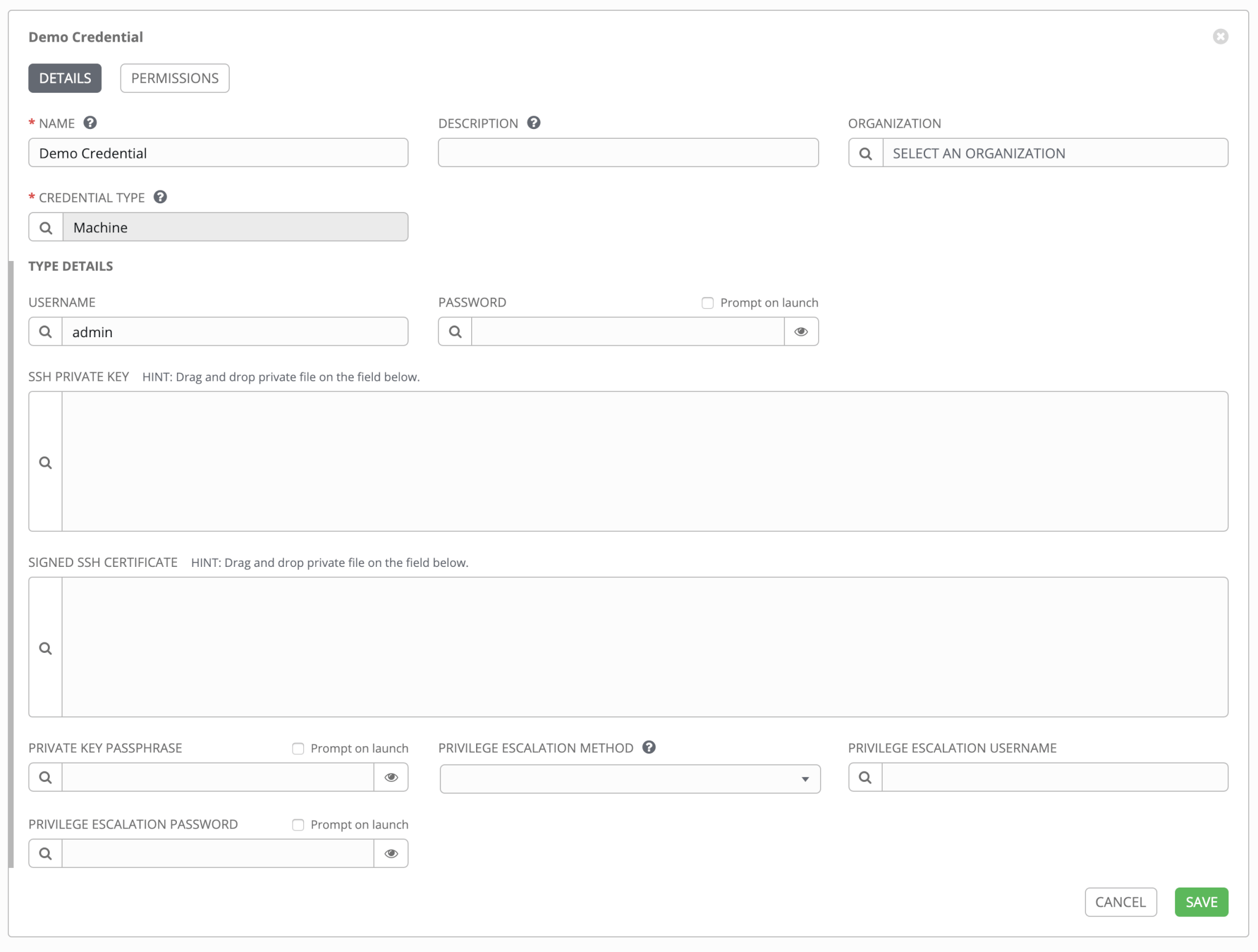
- If you are using Ansible Tower , add
sudopassword in credential as shown below.
Rebooting a Windows Machine
What about Windows Machine rebooting ? As you know you can manage Windows machines as well using Ansible and this reboot task will be needed as part of your automation workflow.
Learn how to configure Windows Node for Managing by Ansible .
And the good news is that, like any other windows alternative there is a dedicated Ansible win_reboot module to handle this.
- name: Reboot a Windows Machine
  ansible.windows.win_reboot:
    reboot_timeout: 360
Refer to the Ansible win_reboot module Documentation for details.

Gineesh Madapparambath
Gineesh Madapparambath is the founder of techbeatly. He is the co-author of The Kubernetes Bible, Second Edition and the author of Ansible for Real Life Automation. He has worked as a Systems Engineer, Automation Specialist, and content author. His primary focus is on Ansible Automation, Containerisation (OpenShift & Kubernetes), and Infrastructure as Code (Terraform). (Read more: iamgini.com)



 Aneesh Mohan